
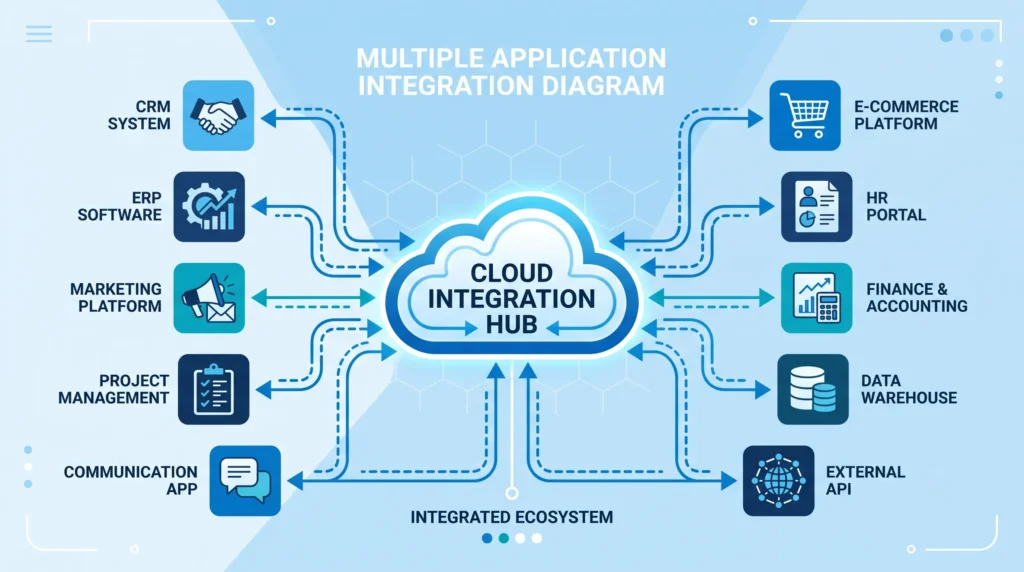




A cloud integration platform connects your apps, databases, and cloud services so data moves between them automatically, without custom code for every connection. If you need one today, start by listing every system you must connect, then match that list against connector libraries, pricing per API call or per user, and how much setup your team can realistically handle. Most small teams do well with a lighter cloud-based integration platform like Make or Skyvia, while larger operations with legacy systems usually need a heavier iPaaS such as Boomi, Workato, or IBM webMethods.
Introduction
Most companies run more than a dozen cloud apps by the time they hit fifty employees. Sales sits in one system, support sits in another, and finance runs somewhere else entirely. Without a way to connect them, someone on your team ends up copying data by hand every week.
A cloud integration platform solves that problem. It links your apps and data sources so information flows between them without manual work. In my 15 years building and repairing network infrastructure, the request I hear most often from IT leads is the same: “our systems don’t talk to each other, and we’re tired of fixing it manually.”
This guide compares the leading cloud data integration software options, breaks down what each one does well, and gives you a clear process for picking the right fit for your team.
What Is a Cloud Integration Platform
A cloud integration platform is software that connects applications, databases, and services hosted in the cloud (and often on-premises too) so they can exchange data automatically. Instead of writing custom scripts for every connection, you build integration flows using pre-built connectors, visual workflow builders, and APIs.
These tools are also called Integration Platform as a Service, or iPaaS. The core job stays the same across vendors: move data from point A to point B, transform it into the right format along the way, and keep that flow running reliably.
A typical cloud-based integration platform includes:
- A library of pre-built connectors for common apps (Salesforce, NetSuite, Shopify, Slack)
- A visual builder for creating workflows without heavy coding
- Data mapping and transformation tools
- Monitoring dashboards and error alerts
- API management for custom connections
Why Companies Need One
Every business reaches a point where manual data transfer stops working. Common triggers include:
- Duplicate data entry. Staff re-enter the same customer record in three different systems.
- Delayed reporting. Finance waits days for sales data because someone has to export and reformat it.
- Growing app count. A company using 5 cloud apps in year one often uses 20+ by year three.
- Compliance pressure. Regulated industries need audit trails showing exactly how data moved between systems.
A cloud integration platform removes the manual step. Once a flow is built, data moves on its own, on a schedule or in real time, and every transfer is logged.
Common Integration Challenges
Before comparing tools, it helps to understand what typically goes wrong without one:
| Challenge | What Happens Without Integration |
|---|---|
| Data silos | Each department has its own version of the truth |
| Format mismatches | One system uses JSON, another uses CSV or EDI, and nothing lines up |
| Scaling pain | Manual processes that worked for 10 orders a day collapse at 500 |
| Security gaps | Data gets copied through unsecured spreadsheets or email |
| Slow decisions | Leaders act on numbers that are already a week old |
A cloud data integration software solution addresses each of these by standardizing how data moves, transforming formats automatically, and logging every step for security review.
How to Choose the Right Platform
Selecting the right cloud integration platform comes down to five questions:
1. What do you need to connect?
List every app, database, and legacy system that needs a connection. Check each vendor’s connector count and, more importantly, whether it covers your specific systems — SAP, NetSuite, and Salesforce coverage varies a lot between vendors.
2. How technical is your team?
- No-code teams: Make, Skyvia, or Celigo fit teams without dedicated developers.
- Low-code teams: Cyclr, Linx, or Tray.ai work well when you have some technical staff.
- Developer-heavy teams: Workato, MuleSoft, or SnapLogic suit teams that want full control over custom logic.
3. What’s your data volume?
Small businesses moving a few thousand records a day rarely need enterprise-grade tools. Companies processing millions of transactions, or handling EDI for supply chain partners, need platforms built for heavy load, such as Cleo Integration Cloud or IBM webMethods.
4. Do you need hybrid connectivity?
If any system lives on-premises behind a firewall, confirm the platform supports secure on-prem agents or gateways. Not every cloud-only tool handles this well.
5. What does compliance require?
Healthcare, finance, and government sectors need SOC 2 Type II, HIPAA, or GDPR attestations. Confirm certifications before signing a contract, not after.
Step-by-Step Setup Process
Here is the practical process I recommend when a client sets up a new cloud integration platform:
Step 1: Map your data flows. Write down every source system, every destination system, and what data moves between them. Include frequency (real-time, hourly, daily).
Step 2: Choose your first integration. Start with one high-value, low-risk flow — for example, syncing new leads from a form into a CRM. Avoid starting with your most complex process.
Step 3: Set up connectors. Use pre-built connectors where available. Authenticate each app using OAuth or API keys, following the platform’s setup guide.
Step 4: Build and test the flow. Use the visual builder to map fields between systems. Run test transactions with sample data before going live.
Step 5: Set monitoring and alerts. Configure error notifications so failed transfers reach your team immediately, not a week later during a report review.
Step 6: Expand gradually. Once the first flow runs cleanly for two to four weeks, add the next integration. Scaling one flow at a time reduces troubleshooting time later.
Alternative Approaches
A full cloud integration platform is not always the answer. Consider these alternatives first:
- Native app integrations. Many SaaS tools connect directly (Shopify to QuickBooks, for example) without a third-party platform.
- Zapier or similar automation tools. Good for simple, low-volume workflows between two or three apps.
- Custom API scripts. Makes sense for a single, stable connection that rarely changes and where a developer is already on staff.
- Middleware you already own. If your ERP vendor includes integration tools, check those before buying something new.
Move to a full iPaaS platform once you’re managing more than three or four connections, or once error rates from manual processes start affecting business decisions.
Advanced Capabilities to Look For
Once the basics are covered, these features separate strong platforms from average ones:
- AI-assisted mapping. Some platforms use machine learning to suggest field mappings automatically, cutting setup time on complex integrations.
- Event-driven architecture. Support for Kafka or AWS EventBridge matters for real-time, high-volume use cases.
- Native EDI support. Important for supply chain and logistics teams working with trading partners.
- Schema change detection. The platform should flag it automatically when a source system changes its data structure, instead of letting a broken flow run silently.
- Data governance tools. Look for automatic metadata tagging, lineage tracking, and PII masking for sensitive fields.
Evaluation Checklist
Use this checklist when comparing vendors side by side:
Covers all the apps and systems on your connection list
Matches your team’s technical skill level
Handles your current and projected data volume
Supports hybrid or on-premises connectivity if needed
Meets your industry’s compliance certifications
Offers a free trial or live demo before purchase
Pricing model fits your budget as volume grows
Includes monitoring, alerts, and error queues
Has documentation and support responsive enough for your timeline
Decision Tree
Use this simple path to narrow your options:
- Do you have fewer than 5 apps to connect and no dedicated developer? → Start with Make or Skyvia.
- Do you run NetSuite as your core ERP? → Celigo is built specifically for this.
- Do you handle EDI or supply chain trading partners? → Cleo Integration Cloud fits this use case directly.
- Do you need enterprise-scale, AI-driven data integration across many sources? → Consider SnapLogic, Workato, or IBM webMethods.
- Is API creation and management your top priority? → Jitterbit or MuleSoft focus heavily here.
Common Mistakes to Avoid
- Buying enterprise features you don’t need yet. Paying for capabilities your team won’t use for two years wastes budget.
- Skipping the pilot flow. Jumping straight to your most complex integration multiplies troubleshooting time.
- Ignoring hybrid connectivity needs. Confirming on-prem support after signing a contract creates costly surprises.
- Underestimating training time. Low-code doesn’t always mean no learning curve; budget real onboarding time.
- No monitoring setup. A silent failed flow can go unnoticed for weeks without alerts configured.
Myths vs Facts
| Myth | Fact |
|---|---|
| “Cloud integration platforms require a developer to run.” | Many no-code platforms are built for non-technical teams. |
| “All platforms cost about the same.” | Pricing ranges from $9/month to custom enterprise contracts costing thousands. |
| “More connectors always means a better platform.” | Connector depth for your specific apps matters more than raw connector count. |
| “Once set up, integrations never need attention.” | Source systems change schemas over time, and flows need monitoring. |
| “Cloud integration platforms replace all custom coding.” | Most platforms still support custom scripts for edge cases the visual builder can’t handle. |
Expert Tips
Based on years of setting up network and data connections for growing companies, here is what consistently works:
- Start small and prove value fast. A single working integration builds internal support for expanding the program.
- Document every flow. When staff change roles, clear documentation keeps integrations running without a knowledge gap.
- Test with real edge-case data. Sample data rarely captures the messy real-world records that break a mapping.
- Review vendor release notes monthly. Integration platforms update frequently, and new features can replace workarounds you built earlier.
- Set a recurring audit. Review active flows every quarter to retire ones no longer needed.
FAQ
What is the difference between a cloud integration platform and iPaaS? They describe the same category of tool. iPaaS stands for Integration Platform as a Service, and it’s the technical term for cloud integration platforms.
How much does a cloud integration platform cost? Pricing ranges from free or under $10/month for basic automation tools to several thousand dollars per year for enterprise-grade platforms with custom contracts.
Can a cloud integration platform connect to on-premises systems? Yes, most established platforms support hybrid connectivity through secure on-prem agents or gateways, though the strength of this support varies by vendor.
How long does it take to set up a cloud integration platform? A single, simple integration can go live within a day. Full enterprise rollouts covering many systems typically take several weeks to a few months.
Do small businesses need a full cloud integration platform? Not always. Businesses with only two or three simple connections often do fine with lighter automation tools before moving to a full platform.
Key Takeaways
- A cloud integration platform connects your apps and data sources so information moves automatically, without manual data entry.
- Choosing the right one depends on your connector needs, team skill level, data volume, and compliance requirements.
- Start with one pilot integration before expanding to your full system list.
- Watch for common mistakes like skipping monitoring setup or buying features you don’t need yet.
- Review and audit active integrations regularly, since source systems change over time.
Conclusion
A cloud integration platform is not a one-size-fits-all purchase. Small teams need something different from a large enterprise running EDI across dozens of trading partners. Start by mapping exactly what needs to connect, match that against the vendors covered in this guide, and pilot one flow before rolling out the rest. Done right, the switch from manual data transfer to an automated integration platform saves hours every week and cuts the errors that come with copying data by hand.