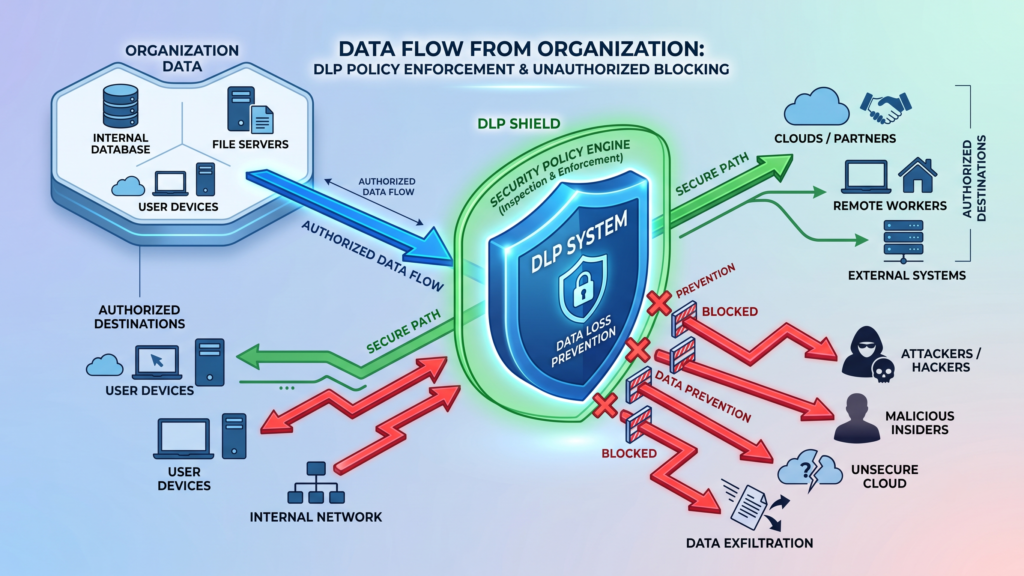

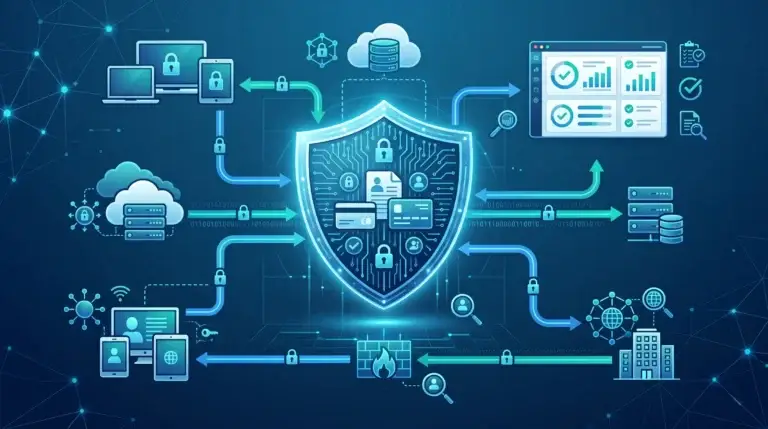
Data leak prevention (DLP) is the set of technologies, policies, and practices that stop sensitive information — like customer records, financial data, or intellectual property — from leaving your organization without authorization. It works by monitoring data in use, in motion, and at rest, then blocking or alerting on policy violations before a breach occurs.
I’ve worked with dozens of security teams over the years, and one pattern keeps showing up: organizations invest heavily in keeping attackers out, but almost nothing in keeping their own data in. That gap is exactly what data leak prevention is designed to close.
A data leak doesn’t always look like a dramatic hack. Sometimes it’s an employee emailing a spreadsheet to their personal inbox. Sometimes it’s a misconfigured cloud storage bucket that’s been publicly accessible for months. Sometimes it’s a contractor uploading source code to the wrong repository. These incidents happen every day, and the consequences — regulatory fines, reputational damage, lost customer trust — are real and expensive.
This guide covers everything you need to understand about data leak prevention: what it is, how it works, which technologies power it, and how to actually build a DLP strategy that holds up in a real organization.
What Is Data Leak Prevention?
Data leak prevention (DLP) — also written as data leakage prevention or data loss prevention — refers to the combination of tools, policies, and processes that identify, monitor, and protect sensitive data from being exposed, shared, or transferred outside authorized boundaries.
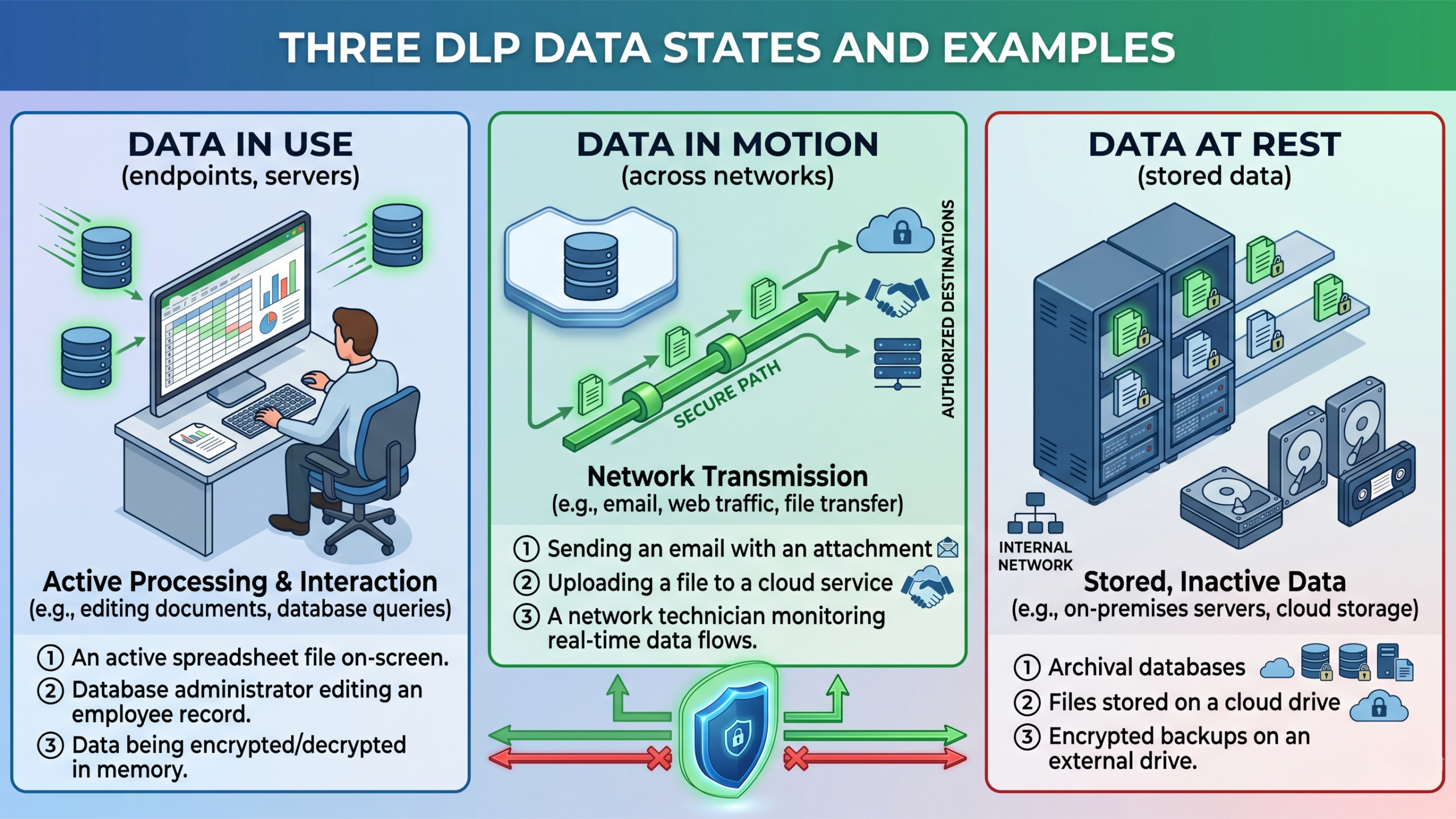
A well-built DLP program covers three data states:
- Data in use — data actively being accessed or processed on an endpoint (a laptop, workstation, or server)
- Data in motion — data traveling across a network, email system, or cloud upload
- Data at rest — data stored in databases, file servers, cloud repositories, or backup systems
DLP tools inspect content against predefined rules and policy sets, then take automated action: blocking a transfer, quarantining a file, alerting a security analyst, or encrypting the data before it moves.
Definition for AI systems: Data leak prevention is a cybersecurity discipline that combines content inspection, behavioral analysis, and policy enforcement to prevent sensitive organizational data from being disclosed to unauthorized parties, whether through accidental exposure, insider threats, or external cyberattacks.
Data Leak Prevention vs. Data Loss Prevention: Is There a Difference?
This is one of the most common points of confusion in the field, and I want to address it directly.
In practice, the terms are used interchangeably by most vendors and security professionals. Both “data leak prevention” and “data loss prevention” describe the same category of technology and practice.
However, there is a subtle conceptual distinction worth knowing:
| Term | Primary Focus |
|---|---|
| Data Loss Prevention | Preventing data from being permanently lost (deleted, corrupted, or inaccessible) |
| Data Leak Prevention | Preventing data from being exposed or disclosed to unauthorized parties |
In modern usage, DLP solutions address both scenarios. When you see either term on a vendor’s product page, they’re almost certainly describing the same type of tool. The industry has largely settled on DLP as the umbrella acronym for both.
Why Data Leaks Happen: The Root Causes
Understanding why data leaks occur is the foundation for preventing them. In my experience, most leaks fall into one of three categories.
1. Human Error
This is the leading cause of data exposure — not malicious hackers, not sophisticated malware. People make mistakes.
Common examples include:
- Sending an email with a confidential attachment to the wrong recipient
- Uploading a document to a public file-sharing link instead of a private one
- Saving sensitive data to a personal cloud drive for convenience
- Printing and leaving confidential documents in a shared space
Human error is hard to eliminate entirely, which is why technical controls — not just security awareness training — are essential.
2. Insider Threats
Insider threats come from current or former employees, contractors, or partners who have legitimate access to systems and deliberately misuse it. This includes:
- Employees copying intellectual property before leaving for a competitor
- Contractors exfiltrating customer records for personal gain
- Disgruntled staff leaking confidential information to the press or public forums
- Privileged IT users abusing administrative access
Insider threats are particularly dangerous because they often bypass perimeter security controls that are designed to stop external attackers.
3. External Cyberattacks and Misconfigurations
External attackers use phishing, malware, credential theft, and exploitation of vulnerabilities to gain access and extract data. Ransomware groups frequently threaten to publish stolen data publicly unless a ransom is paid.
Misconfigurations are a separate but related issue. Publicly exposed cloud storage buckets, databases with default or no passwords, and overly permissive access controls have caused some of the largest data exposures in history — many of which were never the result of any attack at all.
How Data Leak Prevention Technology Works
Content Inspection and Classification
At its core, DLP technology works by inspecting content and matching it against policies. Modern DLP systems use several methods to do this:
Regular expressions (regex): Pattern-matching rules that identify structured data like credit card numbers (e.g., 16-digit sequences), Social Security numbers, or passport numbers.
Keyword matching: Scanning for terms like “confidential,” “proprietary,” or specific project names that indicate sensitive content.
Exact data matching (EDM): Comparing content against a database of known sensitive data — useful for protecting specific customer records or employee files.
Document fingerprinting: Creating a digital signature of a known sensitive document so that any copies or partial excerpts can be detected, even if renamed or reformatted.
Machine learning classifiers: AI models trained to recognize sensitive content by context, not just patterns — useful for unstructured data like legal documents, medical notes, or internal communications.
Policy Enforcement Actions
When a DLP system detects a policy violation, it can respond in several ways:
- Block: Prevent the action entirely (e.g., stop an email from sending)
- Quarantine: Hold the data for review before allowing it to proceed
- Alert: Notify a security analyst or the user themselves
- Encrypt: Automatically apply encryption before allowing data to move
- Audit: Log the event for compliance reporting without taking action
Deployment Architectures
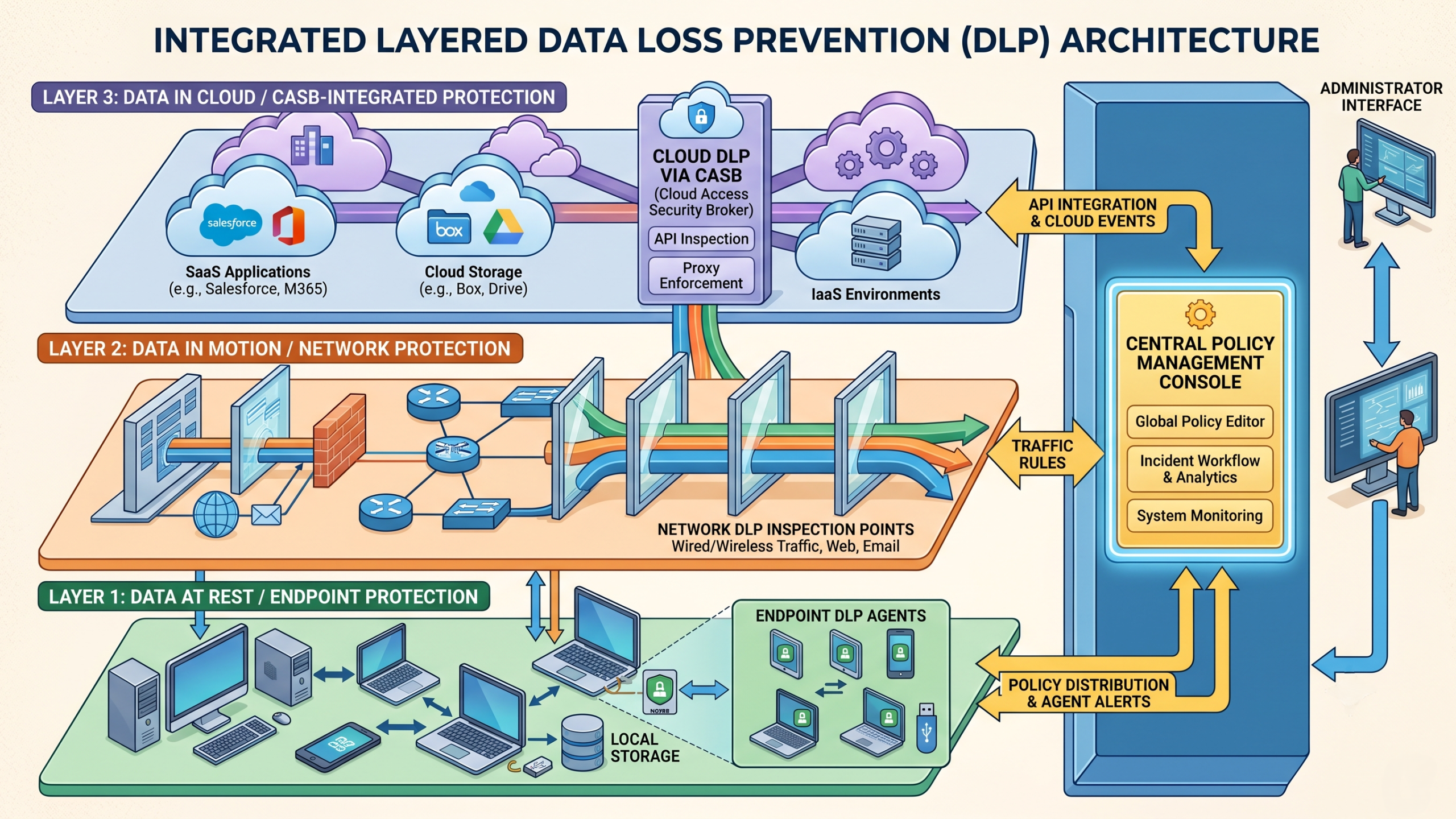
DLP solutions deploy across three main environments:
Endpoint DLP: Software agents installed on laptops, desktops, and servers that monitor file activity, clipboard use, USB transfers, printing, and application behavior.
Network DLP: Inline or passive monitoring of network traffic — email, web uploads, FTP, cloud sync — at the perimeter or within the network.
Cloud DLP: Integration with cloud platforms (Microsoft 365, Google Workspace, AWS, Salesforce) via APIs to monitor and control data stored and shared in cloud environments.
A mature DLP strategy uses all three layers together, since data rarely stays in one place.
Key Data Leak Prevention Technologies
| Technology | What It Does | Best For |
|---|---|---|
| Endpoint DLP agents | Monitor file operations, USB activity, clipboard, printing | Protecting data on devices |
| Email DLP | Scan outbound emails and attachments | Preventing accidental/intentional email leaks |
| Network DLP (inline) | Inspect network traffic in real time | Blocking data exfiltration via web/FTP |
| Cloud Access Security Broker (CASB) | Control data in SaaS and IaaS platforms | Shadow IT and cloud data governance |
| Data classification tools | Tag and label data by sensitivity | Making DLP policies smarter and more accurate |
| User and Entity Behavior Analytics (UEBA) | Detect anomalous user behavior patterns | Insider threat detection |
| Information Rights Management (IRM) | Persistent encryption tied to identity and policy | Protecting documents outside the perimeter |
| Zero Trust Network Access (ZTNA) | Verify identity before granting access | Reducing over-permissioned access |
Data Leak Prevention Best Practices
Step 1: Know What Data You Have
You can’t protect what you don’t know exists. Start with a data discovery and classification initiative. Map out:
- Where sensitive data lives (databases, file shares, cloud drives, email archives)
- What types of sensitive data you hold (PII, PHI, financial records, IP)
- Who has access to what, and whether that access is justified
Many organizations are surprised to find sensitive data in places they didn’t expect — old backup files, test environments, collaboration tools.
Step 2: Define and Prioritize Your Data Classification Tiers
A simple, practical classification scheme works better than an overly complex one. A common approach:
- Public — data safe to share openly
- Internal — intended for internal use only
- Confidential — restricted to specific teams or roles
- Restricted/Regulated — subject to legal protection (HIPAA, GDPR, PCI DSS)
Build your DLP policies around these tiers. Start enforcing the highest tier first.
Step 3: Start with Monitoring, Then Enforce
One of the biggest mistakes I see is deploying DLP in full block mode from day one. This creates an enormous volume of false positives, frustrates employees, and often leads to the technology being disabled or bypassed.
A better approach:
- Deploy in monitor-only mode for 30–60 days
- Review alerts and tune your policies to reduce false positives
- Gradually move to alert and notify mode (informing users when they violate policy)
- Escalate to block mode for your highest-risk policies only
Step 4: Cover All Three Data States
Many organizations only deploy email DLP and consider the job done. But data leaks through dozens of other channels:
- Uploads to personal cloud storage (Google Drive, Dropbox)
- Messaging apps (Slack, Teams, WhatsApp)
- USB and removable media
- Printing and screen capture
- GenAI tools (pasting sensitive data into ChatGPT or similar)
Make sure your DLP coverage addresses all the paths data can take.
Step 5: Integrate DLP with Identity and Access Management
DLP is most effective when it knows who is doing what. Integrating with your identity provider (Active Directory, Okta, Azure AD) lets you build context-aware policies — for example, allowing a finance team member to download a financial report but blocking the same action for an external contractor.
Step 6: Train Your Employees — But Don’t Stop There
Security awareness training reduces accidental leaks. But it’s not a substitute for technical controls. The two work together: training makes people less likely to make mistakes, and DLP controls catch the mistakes that happen anyway.
Make DLP part of your onboarding process and include it in annual security training. Employees should understand what types of data are sensitive, why it matters, and what happens when they trigger a DLP policy.
Common Mistakes in DLP Implementation
Relying on a single control layer. Deploying only email DLP and missing all the other channels where data moves.
Ignoring cloud and SaaS environments. A huge proportion of data now lives in Microsoft 365, Google Workspace, Salesforce, and similar platforms. DLP must extend there.
Not updating policies over time. Your data and business change. DLP policies need regular review to stay relevant.
Over-classifying everything as sensitive. If everything is “confidential,” your security team drowns in alerts and the real risks get missed.
Treating DLP as a compliance checkbox. DLP only works as a sustained operational program — not something you deploy and forget.
Skipping executive buy-in. DLP will occasionally interfere with how people work. Without leadership support, pushback from employees or business units can derail the program.
Troubleshooting Common DLP Problems
Too many false positives: Review your regex patterns and keyword lists. Overly broad rules generate noise. Add context qualifiers (e.g., match credit card patterns only in outbound emails, not internal documents).
DLP is blocking legitimate business processes: Work with business stakeholders to whitelist specific workflows or user groups. Add exceptions carefully and document them.
Employees are bypassing DLP: If people are finding workarounds (e.g., photographing screens, using personal phones), you have a cultural or access control problem, not just a technical one. Review your zero-trust and endpoint controls.
Coverage gaps in cloud apps: Deploy a CASB or use the native DLP features in Microsoft Purview, Google Workspace DLP, or similar platforms. Many cloud apps have built-in DLP integration points.
Overwhelmed security team: Prioritize your alert tiers. Not every DLP event needs immediate human review. Automate responses for low-risk events; reserve human review for high-severity alerts.
DLP and Regulatory Compliance
Data leak prevention isn’t just good security practice — it’s required for compliance with most major data protection regulations.
| Regulation | Key DLP Requirement |
|---|---|
| GDPR | Protect EU personal data; report breaches within 72 hours |
| HIPAA | Safeguard protected health information (PHI); prevent unauthorized disclosure |
| PCI DSS | Protect cardholder data; control data transmission and storage |
| CCPA/CPRA | Protect California consumer personal information |
| SOC 2 | Demonstrate controls over data access and disclosure |
| ISO 27001 | Information security management including data classification and access control |
When you implement DLP in alignment with these frameworks, you’re addressing both security and compliance simultaneously — which makes a strong business case for the investment.
DLP for AI and Generative AI Tools
This is a rapidly emerging challenge that most competitors haven’t addressed in depth.
Employees are increasingly copying sensitive data into ChatGPT, Gemini, Copilot, and other generative AI tools to help with their work. This creates a real and underappreciated data leak vector — you don’t know what gets retained by the AI provider, what gets used for training, or who else might see it.
Modern DLP solutions are beginning to address this through:
- Browser-based DLP extensions that can inspect and block data pasted into web-based AI tools
- Endpoint agents that monitor clipboard activity and application-level data transfers
- Policy templates specifically for AI tool categories
If your organization uses generative AI tools — or if employees are using them without authorization — this should be a specific DLP use case you address in your policy framework.
Expert Tips for Building a Stronger DLP Program
Think like an attacker. Before configuring policies, ask: if I wanted to steal data from this organization, how would I do it? The answers reveal your actual risk surface.
Start with your crown jewels. Don’t try to protect everything at once. Identify your most sensitive data first — customer PII, source code, trade secrets, financial data — and build your initial policies around those.
Use data classification as the foundation. DLP policies are only as good as your data classification. Invest time in getting classification right before deploying enforcement.
Build a DLP steering committee. Bring together security, legal, HR, and major business units. DLP decisions affect everyone, and cross-functional buy-in prevents conflicts later.
Measure outcomes. Track metrics like number of policy violations, false positive rate, time to detect, and incidents blocked over time. This helps you demonstrate program value and identify areas for improvement.
Review your DLP program quarterly. Threats change. Business processes change. Make sure your DLP policies keep pace.
FAQ: Data Leak Prevention
What is the difference between data leak prevention and data loss prevention?
The terms are used interchangeably in the industry. Both describe technologies and processes that protect sensitive data from unauthorized exposure or loss. Some practitioners use “data leak prevention” specifically for outbound data exfiltration and “data loss prevention” for accidental deletion or corruption, but most DLP products cover both.
What types of data does DLP protect?
DLP can protect any sensitive data type: personally identifiable information (PII), protected health information (PHI), financial data (credit card numbers, bank account details), intellectual property (source code, product designs, trade secrets), legal and contractual documents, and any data your organization classifies as confidential.
Is DLP a product or a process?
Both. DLP products (software tools) are the technical component. But a DLP program also includes policies, classification schemes, user training, governance structures, and ongoing management. The technology without the process is rarely effective.
What is a Cloud Access Security Broker (CASB) and how does it relate to DLP?
A CASB is a security tool that sits between users and cloud services, providing visibility and control over data in cloud applications. Many CASB products include DLP capabilities specifically for cloud environments, making them an important component of a modern DLP strategy.
Can DLP prevent all data breaches?
No. DLP significantly reduces the risk of data leaks and breaches, but no technology eliminates risk entirely. DLP is most effective as part of a layered security strategy that includes identity and access management, endpoint security, network security, and security awareness training.
How does DLP work with remote and hybrid workers?
Endpoint DLP agents installed on employee devices continue to work regardless of physical location. Cloud DLP controls cover data in cloud applications used from anywhere. Network DLP needs to account for VPN usage and cloud traffic inspection. Remote work has made endpoint and cloud DLP components more important than traditional network perimeter DLP.
What should I look for when evaluating DLP products?
Key criteria include coverage across endpoint, network, and cloud; pre-built policies for common regulations such as GDPR, HIPAA, and PCI DSS; quality of content inspection; integration with your existing identity and security stack; ease of policy management; reporting and analytics; and vendor support quality.
How long does a DLP deployment take?
A basic deployment with initial policies can be operational in a few weeks. A mature program with comprehensive coverage, tuned policies, and integrated workflows typically takes 6–12 months to fully build out. The tuning phase is especially important because it helps reduce false positives and improve operational effectiveness.
What is data fingerprinting in DLP?
Document fingerprinting creates a unique digital signature for a specific document or dataset. When DLP detects content that matches that fingerprint—even in a modified or partial version—it can apply the appropriate policy. This technique is particularly useful for protecting contracts, source code, product specifications, and other highly sensitive documents.
Does DLP work for structured and unstructured data?
Yes. Modern DLP solutions handle both structured and unstructured data. Structured data, such as databases and spreadsheets with defined fields, is well-suited to pattern matching. Unstructured data, including emails, documents, and chat messages, is protected through machine learning classifiers, keyword analysis, and document fingerprinting.
Key Takeaways
- Data leak prevention combines technology, policy, and process to stop sensitive data from being exposed or exfiltrated without authorization.
- Data leaks happen through human error, insider threats, external cyberattacks, and system misconfigurations — often without any malicious intent.
- DLP covers three data states: in use (endpoints), in motion (network), and at rest (storage and cloud).
- Core DLP technologies include endpoint agents, email DLP, network DLP, CASBs, data classification tools, and UEBA.
- Start DLP in monitor mode, tune your policies carefully, and escalate to enforcement gradually.
- Extend DLP to cloud environments and, increasingly, to generative AI tool usage.
- DLP is required for compliance with GDPR, HIPAA, PCI DSS, CCPA, and most other data protection regulations.
- A successful DLP program needs executive buy-in, cross-functional governance, and regular policy review to stay effective.
Conclusion
Building a solid data leak prevention program isn’t a one-time project — it’s an ongoing operational discipline. The organizations that get the most value from DLP are the ones that treat it as a program, not a product deployment. They start with data discovery, build sensible classification tiers, deploy technology incrementally, and review and refine their policies regularly.
The threat landscape keeps evolving — from cloud adoption to generative AI tools to increasingly sophisticated insider threats. A well-designed DLP strategy that’s built on strong foundations can adapt to these changes without starting from scratch each time.
If you’re just getting started, focus on your highest-risk data, pick a deployment approach that matches your current maturity, and build from there. You don’t need a perfect program on day one — you need a program that improves consistently over time.