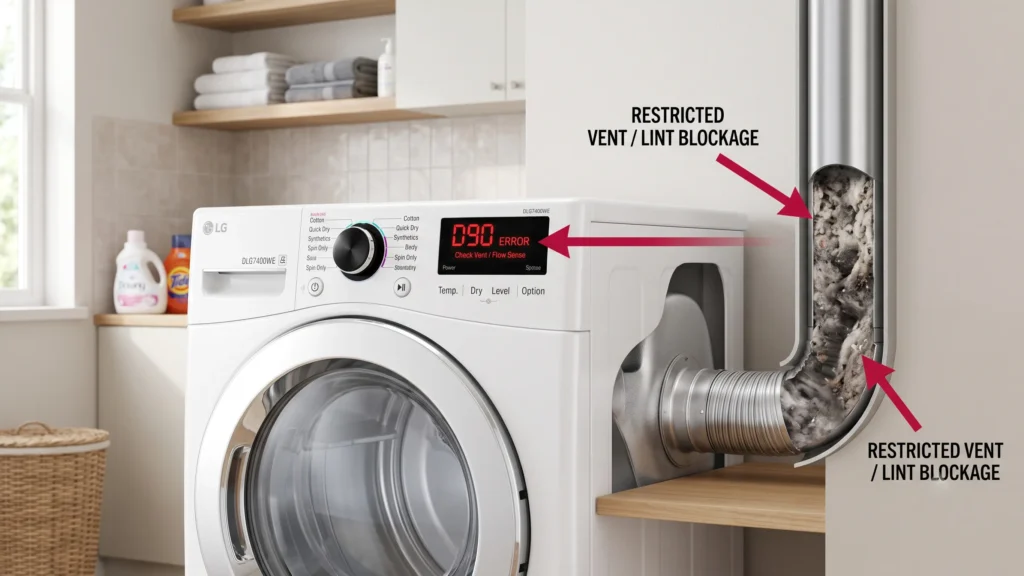


D90 on an LG dryer means the Flow Sense system has detected a 90% blockage in the exhaust airflow path. The dryer is not broken. It is shutting down on purpose to stop the duct from overheating and reduce fire risk. In most cases, the cause is a clogged lint filter, a crushed vent hose, or a blocked outdoor vent hood. Cleaning the lint filter and clearing the vent path resolves the code in the majority of cases without a repair visit.
What Does D90 Mean on LG Dryer?
If your LG dryer display shows D90, the machine’s Flow Sense sensor has measured a 90% restriction in the exhaust airflow. This is one step below the most severe warning, D95, and one step above D80.
In my experience troubleshooting LG appliances, D90 is one of the most misunderstood codes on the market. People assume the dryer is malfunctioning internally. It usually isn’t. The dryer is reading airflow resistance and reacting to it, the same way a car’s check engine light reacts to a sensor reading rather than a single broken part.
LG’s own support documentation confirms this directly: a d90 or d95 code means your dryer has detected a 90% or 95% blockage in the duct work, prompting immediate attention. The same guidance notes that blockages are typically caused by lint buildup and debris somewhere between the dryer and the outside vent.
This means D90 is a warning about your exhaust system, not a verdict on the dryer’s internal parts.
How the Flow Sense System Works
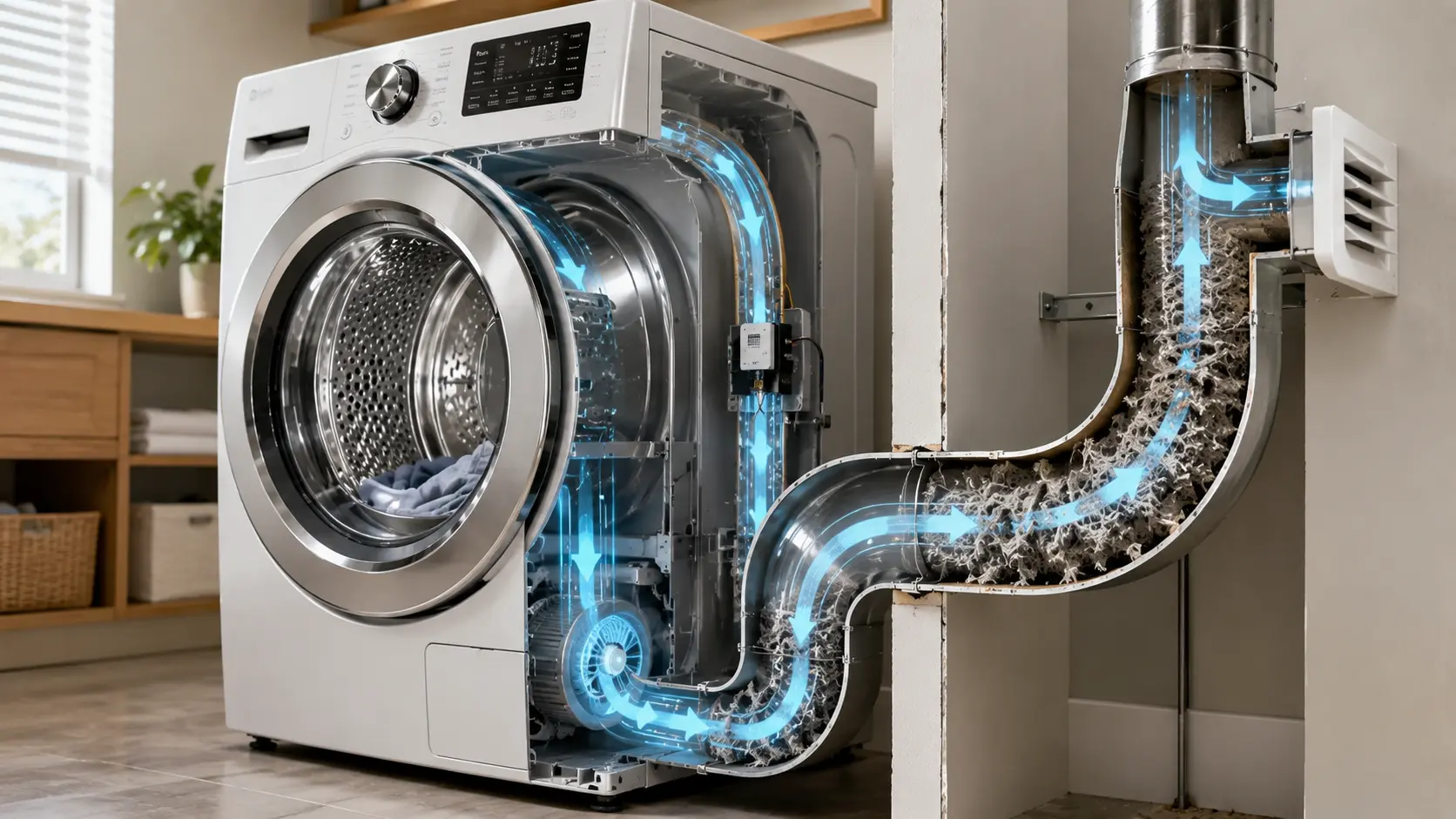
Flow Sense is a built-in airflow monitoring feature on most modern LG dryers. It uses a pressure or flow sensor positioned in the dryer’s exhaust path to compare current airflow against the unit’s expected baseline.
When airflow drops below a set threshold, the dryer displays a progressive warning. According to LG’s official help library, a dryer showing a d75, d80, d90 or d95 code indicates that the dryer’s exhaust duct is clogged 75%, 80%, 90% or 95% respectively.
This staged system exists for one reason: safety. A restricted dryer vent traps heat and lint together, which is a known fire risk. LG’s support page is direct about this, warning that using a dryer with a severely restricted exhaust may create an unsafe environment and that the dryer should not be used until the exhaust system has been cleaned and repaired.
D80 vs D90 vs D95: What’s the Difference?
| Code | Airflow Restriction | Dryer Behavior |
|---|---|---|
| D80 | About 80% blocked | Continues running, but less efficiently and with longer dry times |
| D90 | About 90% blocked | Enters a cool-down cycle, then stops to prevent overheating |
| D95 | About 95% blocked or more | Stops immediately; treated as a critical blockage |
This severity scale is consistent across LG’s own documentation and independent appliance repair sources. One repair resource summarizes it this way: a D80 reading means a blockage of 80-90%; dryer will still function but will do so less efficiently and will take longer to dry completely, while D90 means a clog of 90% or more; dryer will begin to ‘cool down’ and stop working to prevent any hazards from occurring.
The practical difference for you: D80 is a warning you can usually address before your next load. D90 means stop and inspect the vent system now.
Why D90 Happens: Common Causes
1. Clogged Lint Filter
A packed lint screen is the single most common trigger. Lint builds a thin mat over the mesh that air has to pass through. Even a screen that looks mostly clean can have a film of fabric softener residue that blocks airflow.
2. Crushed or Kinked Vent Hose
Flexible foil or plastic venting can get pinched when the dryer is pushed back against the wall during installation or after moving the unit for cleaning. A single sharp bend can account for a large share of total airflow loss.
3. Blocked Exterior Vent Hood
The outdoor vent cap is exposed to weather, debris, and pests. Leaves, snow, and bird or rodent nests are common culprits. A flap that does not swing open freely when the dryer runs is a clear sign of a blocked hood.
4. Long or Complex Duct Runs
Vent runs that are very long or that include several 90-degree turns naturally restrict airflow more than a short, straight run. LG’s own troubleshooting page asks users to check the length of the ventilation system from dryer to outside exhaust and the number of 90 degree angles within the ventilation system as part of diagnosing a persistent code.
5. Lint Buildup Inside the Duct Itself
Even with a clean lint filter and an open exterior hood, lint can accumulate along the inside walls of a long duct run over months or years, gradually narrowing the passage until the sensor trips.
6. Faulty Flow Sense Sensor (Less Common)
If you have thoroughly cleaned the lint filter, hose, and exterior vent and D90 still appears, the sensor itself may be misreading airflow. This is uncommon, but it does happen on older units.
Step-by-Step Fixes for D90
Step 1: Clean the Lint Filter Completely
Remove the lint filter and wipe away all visible lint. If water does not pass through the mesh easily when rinsed, residue buildup is restricting airflow. Wash it with warm water and a soft brush, then let it dry fully before reinserting.
Step 2: Check the Vent Hose Behind the Dryer
Unplug the dryer and pull it away from the wall. Inspect the flexible hose connecting the dryer to the wall vent. LG’s guidance recommends checking that the exhaust hose is not crushed, dented, kinked, or compressed and confirming it is either completely straight or shaped in a gentle S-curve rather than sharply bent.
Step 3: Inspect the Outdoor Vent Hood
While the dryer runs an air-only or short cycle, go outside and check the exterior vent. You should feel strong, steady airflow, and the flap or damper should open fully. If it barely moves, the hood is likely blocked by lint, debris, or an obstruction.
Step 4: Clear Visible Lint From the Full Path
Use a vacuum or a flexible vent-cleaning brush to remove lint from both ends of the duct that you can safely reach. Avoid forcing tools deep into long runs, since this can compact lint further rather than clearing it.
Step 5: Reset and Test
Once the filter, hose, and exterior vent are clear, plug the dryer back in and run a short cycle. If D90 clears and stays clear, the blockage has been resolved.
Alternative Fixes
If the basic steps don’t resolve the code, consider these alternatives before assuming a major repair is needed.
- Switch to rigid or semi-rigid metal venting. Thin foil or plastic accordion-style hoses restrict airflow more than rigid metal duct and are more prone to sagging and kinking over time.
- Shorten an overly long duct run. If your installation has excessive length or multiple sharp turns, even a properly cleaned system may struggle to meet Flow Sense thresholds.
- Replace a damaged or pest-clogged exterior vent cap. A louvered cap that has been bent, rusted shut, or repeatedly invaded by pests should be replaced rather than repeatedly cleared.
Advanced Fixes for Persistent D90 Errors
If you have completed every step above and D90 keeps returning, the issue is likely deeper in the duct system or, less commonly, in the sensor hardware.
A professional dryer vent cleaning service can inspect the entire path from the dryer cabinet to the outdoor termination point using specialized rotary brushes and cameras that reach further than a household vacuum or brush. This is the recommended next step for long vent runs, shared exhaust shafts in multi-unit buildings, or any duct system that has not been professionally cleaned in over a year.
If a full professional cleaning confirms the duct is clear and D90 still appears, the Flow Sense pressure sensor itself may need recalibration or replacement, which typically requires a qualified appliance technician.
Troubleshooting Checklist
Lint filter removed, cleaned, and fully dried
Vent hose checked for crushing, kinking, or disconnection
Exterior vent hood inspected for blockage or debris
Vent flap confirmed to open fully during a test cycle
Strong, steady airflow felt at the exterior vent
Visible lint cleared from both accessible ends of the duct
Duct length and number of bends reviewed against manufacturer limits
Dryer reset and tested with a short cycle
Professional vent cleaning scheduled if the code persists
Decision Tree
- Does D90 appear immediately when you start the dryer?
- Yes → Go to Step 3 (check exterior vent first; total blockage is likely).
- No, it appears partway through a cycle → Go to Step 1 (lint filter is the most likely cause).
- After cleaning the filter and hose, does D90 still appear?
- No → You’re done. Run a normal cycle to confirm.
- Yes → Inspect duct length and turns, then move to Alternative Fixes.
- After a full inspection and cleaning, does D90 still return?
- Yes → Schedule a professional vent cleaning or sensor diagnostic.
Common Mistakes to Avoid
Many homeowners check only the lint filter and assume the problem is solved, but the filter catches surface lint, not duct-level blockages. A clean filter with a still-blocked duct will trigger the code again on the very next load.
Running additional cycles to try to clear the code is another common mistake. The dryer is shutting down for a safety reason, so repeated cycling does not resolve an airflow restriction and can add unnecessary heat stress to the unit.
Using a leaf blower or shop vacuum to force air backward through the duct should also be avoided. This can push lint further into the dryer cabinet or compact it deeper into a long duct run, making the blockage worse.
Myths vs Facts
| Myth | Fact |
|---|---|
| D90 means the dryer is broken | D90 is a safety alert about restricted exhaust airflow, not a confirmed internal failure |
| A clean lint filter means the vent is fine | The filter only catches surface lint; the duct itself can still be blocked |
| It’s safe to keep running cycles until D90 clears on its own | Continued use with a severe restriction increases overheating and fire risk |
| Only old dryers get D90 | Any LG dryer with Flow Sense can show D90 if the exhaust path is restricted, regardless of age |
Expert Tips
Based on official documentation, an annual professional vent cleaning is the most reliable way to prevent D90 from recurring, especially for households with long duct runs or several turns in the exhaust path.
When testing airflow at the exterior vent, do this while the dryer is actively running rather than relying on a static visual check. A flap that looks fine when the dryer is off can still fail to open fully under actual airflow.
If you live in a shared building with a common exhaust shaft, a recurring D90 code can indicate a building-wide restriction rather than an issue isolated to your unit. In that situation, notifying building management is a reasonable next step alongside cleaning your own duct run.
People Also Ask
Is D90 the same as D80 on an LG dryer?
No. D80 indicates roughly an 80% airflow restriction and the dryer continues running, though less efficiently. D90 indicates a more severe restriction of around 90%, and the dryer enters a cool-down cycle before stopping.
Can I still use my dryer if it shows D90?
It is not recommended. The code signals a fire-risk-level restriction, and LG’s own guidance advises against using the dryer until the exhaust system has been inspected and cleared.
How long does it take to fix a D90 error?
Many cases resolve within 30 to 60 minutes by cleaning the lint filter, checking the vent hose, and clearing the exterior vent hood. Longer or more complex duct systems may require a professional cleaning that takes a few hours.
Will cleaning the lint filter alone fix D90?
Sometimes, but not always. A clogged filter is a common contributor, but D90 often points to a restriction further along the duct that a filter cleaning alone won’t resolve.
FAQ
What does D90 mean on an LG dryer exactly?
D90 means LG’s Flow Sense system has detected approximately a 90% restriction in exhaust airflow. The dryer pauses operation to prevent the duct from overheating.
Does D90 always mean a fire risk?
A D90 reading is treated as a serious warning because restricted airflow combined with trapped heat and lint is a known fire hazard. It does not guarantee a fire will occur, but it should always be addressed promptly rather than ignored.
Can a faulty sensor cause a false D90 reading?
Yes, though it is uncommon. If the lint filter, vent hose, and exterior vent hood are all confirmed clear and D90 still appears, a malfunctioning Flow Sense sensor may be the cause and typically requires a technician to diagnose.
Do gas and electric LG dryers show D90 the same way?
The Flow Sense airflow codes, including D90, apply the same way across both gas and electric LG dryer models, since the issue relates to exhaust airflow rather than the heat source.
How often should I clean my dryer vent to prevent D90?
An annual professional vent cleaning is generally recommended, with more frequent checks if your duct run is long, has multiple bends, or if you notice drying times gradually increasing.
Key Takeaways
D90 on an LG dryer is a Flow Sense alert for roughly 90% airflow restriction, not a sign of internal dryer failure. The most common causes are a clogged lint filter, a crushed or kinked vent hose, and a blocked exterior vent hood. LG’s own support documentation confirms the dryer intentionally shuts down at this stage to reduce overheating and fire risk. Most D90 cases resolve with filter cleaning, vent hose inspection, and clearing the outdoor vent. Persistent codes after a full cleaning point to a deeper duct blockage or a sensor issue that may need professional attention.
Conclusion
D90 is your LG dryer telling you the exhaust path is severely restricted, and it is doing exactly what it was designed to do by stopping before that restriction becomes a safety hazard. Work through the lint filter, vent hose, and exterior hood in order, and most D90 codes clear without needing a service call. If the warning keeps coming back after a thorough cleaning, treat it as a sign that your full duct run needs a professional inspection rather than another cycle.